Monday, November 19, 2018

QPI 3 Health, Safety and Environment nov 19


Return signed document for a "big" grade. Past due.


Computers, cell phones and other electronic devices may be used for schoolwork only.                      


Your grade:
100 % on two safety exams


Today:

•In Notes....... DIGITAL CONTENT, 
     Bandwidth ergonomics
A good password is

•Assignment:
 
review for and take or retake safety exams:

Review for the written classroom safety quiz

Review for the computer safety quiz


• Make a new folder in your Google Drive. Title it Portfolio_your first and last name_A2
How to make a new folder in Google drive:
https://topperselfie.blogspot.com/2018/11/create-new-folder-in-google-drive.html

• Upload your work you have completed in this class into this Portfolio folder on Google drive.
Your work should be located in documents on your computer. 

Share this folder with me so I can download and print some of your work


how to share:
https://www.google.com/search?q=how+to+share+a+folder+in+google+drive&rlz=1C5CHFA_enUS801US801&oq=how+to+share+afolder+in+Google+Drive&aqs=chrome.1.69i57j0l5.16701j0j7&sourceid=chrome&ie=UTF-8


subject: Health, Safety and Environment


standards

2) Identify, connect, and demonstrate the correct usage of elements of a typical home computer, including a monitor, keyboard, mouse, network cable, and USB devices (such as camera, memory, or scanner). Perform basic troubleshooting as needed for situations involving these components (e.g., if the computer does not recognize a device).


objectives (what I want you to know or do) 
Score 100% accuracy on classroom and computer safety exams.


assessment:
written exams

presentation/procedure: 
Discussion of safety using the safety rules below
Read and study for exams
Take written exams
Retake exams of students scoring less than 100%


Safety rules in this class

1. Do not throw anything at any time. Even a sheet of paper or an eraser can cause an injury.

2. Use extreme caution when using X-acto knives, paper cutters, mat cutters, scissors, the tape dispenser, or any sharp instruments. Always cut away from your body, especially your hands.

When using X-acto knives for cutting at a drawing table, a piece of mat board, railroad board, or other similar substance should be placed between the item you are cutting and your wooden desktop.

Never take any tools or equipment outside the classroom. Many of these items may be considered weapons and could result in a zero-tolerance offense.

3. Never possess any item that can produce a flame. Never strike a match, lighter, or any other item that can produce a flame. Some materials such as rubber cement, are flammable and can cause fire.

4. When using spray products such as fixative, spray mount, etc., be sure that you do so in proper ventilation.
Inhaling the fumes of spray fixative, rubber cement, or rubber cement thinner could be toxic and hazardous to one's health and lead to respiratory problems.

5. Follow proper safety precautions when working around electrical equipment, outlets, cords, etc. Never make contact with an electrical device when any of your hands or any other body parts are wet.

6. Do not have any food, liquids, soft drinks, milk, etc., near a computer.

7. Do not run, push, shove, or engage in "horseplay" in the classroom.

8. Be sure that your seat is stable and that all its legs are in contact with the floor. Do not lean back in your seat.

9. Know the location of the fire extinguisher. In case of fire, leave the room calmly, turn right and exit the building. Assemble in the parking lot for attendance check.

10. Report any damaged equipment, broken equipment, accidents or any potential hazard to the classroom teacher immediately.

11. OSHA stand for the Occupational Safety and Health Administration

12. Accidents or injuries occurring in the classroom should be reported to the instructor immediately.
Accidents require that an accident report be filed. Even a small scratch may seem minor but could become serious if left untreated.


Review for the written classroom safety quiz

Review for the computer safety quiz


Sunday, November 11, 2018

QPI 7_Inside an advertising agency

Introduction
Students will explore how an advertising agency works.

Topics will include:

Business structure and organization
Business planning
Employee roles and responsibilities
Role of labor organizations
Employee rights
Finance and budgets
Health, Safety and Environment
Community Issues
Technical and productions skills
Personal work habits

10 Standards are covered
QPI 7 is covered


 Standards

1) Research recent developments in information technology affecting the supply/demand characteristics of the job market, including career pathways and occupational outlooks for occupations in business and finance that require information technology expertise. Synthesize findings into a presentation highlighting the typical roles and responsibilities of professionals in high-growth occupations.
2) Identify, connect, and demonstrate the correct usage of elements of a typical home computer, including a monitor, keyboard, mouse, network cable, and USB devices (such as camera, memory, or scanner). Perform basic troubleshooting as needed for situations involving these components (e.g., if the computer does not recognize a device).
3) Correctly and safely execute basic file management operations on a typical personal computer and shared storage media, including the opening, creating, copying, moving, deleting, and renaming of files and folders, as well as searching for a specified file or folder on local or networked storage media.
7) While preparing materials and assignments in this course, use a browser to access and download Internet resources by uniform resource locator (URL), hyperlink, or favorite/bookmark.
8) Use a word processing program to create and format documents with academic and business styles (e.g., memos, letters, agendas, reports, tabular lists) to communicate the results of research, meetings, lab reports, and relevant assignments in this course. Page 3
9) Craft documents using word processing program features and methods such as: a. Paragraph formatting (line spacing, justification, indentations) b. Bulleted and numbered lists c. Tables of multiple columns, with and without borders d. Margins, headers, footers, page numbers, and footnotes e. Typeface fonts and weights, including hyperlinks f. Capitalization, punctuation, number expression, grammar g. Printing orientation, one- or two-sided, to a selected printer h. Bibliographies and tables of contents i. Saving to a file that can be shared and/or transported, including saving to cloudbased or external sources
10) Enhance documents by including graphic arts components such as borders and shaded elements, graphs and charts from other programs, watermarks, and imagery imported from technology devices and drives as well as sources retrieved from the Internet, including adding citations and/or captions for each element when appropriate.
11) Create, format, and edit documents suitable for print or electronic distribution, both four color and two-color (black and white).
13) Complete a comprehensive word-processing project with instructor approval that applies the skills acquired in this section. For example, prepare a contract, MLA-style report, business proposal, or budget report from a student organization.
27) Employ skills covered in this course (document processing, spreadsheet applications, electronic presentations, databases, Internet fluency) to complete a cross curricular project approved by the instructor.


QPI 7_8, 1, and 2_November 13

QPI 7_Inside an advertising agency

Introduction
Students will explore how an advertising agency works.

Topics will include:

Business structure and organization
Business planning
Employee roles and responsibilities
Role of labor organizations
Employee rights
Finance and budgets
Health, Safety and Environment
Community Issues
Technical and productions skills
Personal work habits

10 Standards are covered
QPI 7 is covered


 Standards

1) Research recent developments in information technology affecting the supply/demand characteristics of the job market, including career pathways and occupational outlooks for occupations in business and finance that require information technology expertise. Synthesize findings into a presentation highlighting the typical roles and responsibilities of professionals in high-growth occupations.
2) Identify, connect, and demonstrate the correct usage of elements of a typical home computer, including a monitor, keyboard, mouse, network cable, and USB devices (such as camera, memory, or scanner). Perform basic troubleshooting as needed for situations involving these components (e.g., if the computer does not recognize a device).
3) Correctly and safely execute basic file management operations on a typical personal computer and shared storage media, including the opening, creating, copying, moving, deleting, and renaming of files and folders, as well as searching for a specified file or folder on local or networked storage media.
7) While preparing materials and assignments in this course, use a browser to access and download Internet resources by uniform resource locator (URL), hyperlink, or favorite/bookmark.
8) Use a word processing program to create and format documents with academic and business styles (e.g., memos, letters, agendas, reports, tabular lists) to communicate the results of research, meetings, lab reports, and relevant assignments in this course. Page 3
9) Craft documents using word processing program features and methods such as: a. Paragraph formatting (line spacing, justification, indentations) b. Bulleted and numbered lists c. Tables of multiple columns, with and without borders d. Margins, headers, footers, page numbers, and footnotes e. Typeface fonts and weights, including hyperlinks f. Capitalization, punctuation, number expression, grammar g. Printing orientation, one- or two-sided, to a selected printer h. Bibliographies and tables of contents i. Saving to a file that can be shared and/or transported, including saving to cloud-based or external sources
10) Enhance documents by including graphic arts components such as borders and shaded elements, graphs and charts from other programs, watermarks, and imagery imported from technology devices and drives as well as sources retrieved from the Internet, including adding citations and/or captions for each element when appropriate.
11) Create, format, and edit documents suitable for print or electronic distribution, both four color and two-color (black and white).
13) Complete a comprehensive word-processing project with instructor approval that applies the skills acquired in this section. For example, prepare a contract, MLA-style report, business proposal, or budget report from a student organization.
27) Employ skills covered in this course (document processing, spreadsheet applications, electronic presentations, databases, Internet fluency) to complete a cross curricular project approved by the instructor.

class: Computer Apps 2018_2019
subject: Business Planning and Labor

description of activity:  Review of strategic planning, goals, objectives and forms of business as well as labor, labor organizations and employee right and responsibilities in the field of visual communications

Objective: Describe how an advertising agency works.

Please........
1.Be on time
2.Log onto the site for this class. 
You get a grade for this.
3.When I am giving instructions, 
be in a seat.
4. Do not interfere with instructions
or disrupt class. 
5. When I am giving instructions, your phones and headphones should be invisible. MNPS has specific regulations  for electronic devices. Security of your electronic devices is your responsibility.
6. Do what I ask you to do, when I ask you.
7. Follow all school rules and MNPS rules.
8. It is your responsibility to make up missing assignments. No late work will be accepted after two weeks from the date assigned. The only exception is for excused absences.
9. Be respectful of others.

Return signed document for a "big" grade. Past due.

Check your grades today


No phones except for classwork.

No earbuds or headphones for music. Use for classwork only.


Your grade:
4_advanced_93-100 points. A strong amount of work has been completed. All instructions & specifications met. A comprehensive and wide-ranging exploration of visual qualities, the representation of ideas, media experiments, and technical practice is demonstrated. The work reflects superior thought and imagination.

3_proficient_85-92 points. A reasonable amount of work has been completed. Most instructions and specifications met. The work illustrates satisfactory exploration of visual qualities, and the representation of ideas. There is satisfactory evidence of work on images, media experiments, and technical practice.

2_basic_75-84 points. A small amount of work has been completed. Some instructions and specifications met. The work illustrates some exploration of visual qualities, the representation of ideas. There is some evidence of work on images, media experiments and technical practice.

1_below basic_74 and below. A less than adequate amount of work has been completed. There is little evidence of work on images, media, and technical practice.


0_No work attempted

Today:

•In Notes....... DIGITAL CONTENT, 
  Bandwidth, 
  Computer Vision Syndrome

•Assignment:
 
Read assigned passages below and then complete the worksheet provided, individually


• Make a new folder in your Google Drive. Title it Portfolio_your first and last name_A2
How to make a new folder in Google drive:
https://topperselfie.blogspot.com/2018/11/create-new-folder-in-google-drive.html

• Upload your work you have completed in this class into this Portfolio folder on Google drive.
Your work should be located in documents on your computer. 


QPI 7_All aspects
Items 8, 1, 2

Item 8

8. Labor
Employee rights and responsibilities, role of labor organizations
1. Business Planning
Strategic Planning, Goals, Objectives, Form of Business
2. Management
Organizational Structure, Mission Statement, Employee Handbook, Corporate Culture


Directions:

At the top left side of your paper, write your first and last name and block number

example........
Steve Campbell    Block 3b
QPI 7_items 8, 1 and 2

Read the information below and answer the information below on separate paper. You do not need to write the questions, just the answers. The answers to the questions are found below the questions.

Advertising agency overview

An advertising agency is  firm that is hired to help businesses sell products and services.

An ad agency:

(1) creates new promotional ideas,
(2) designs print, radio, television, and internet advertisements,
(3) books advertisement space and time,
(4) plans and conducts advertising campaigns,
(5) commissions research and surveys, and
(6) provides other such services that help a client in entering and succeeding in a chosen market.

The agency business structure could be sole proprietorship, partnership or corporation.

Ad agency corporate culture
Graphic designers working in ad agencies generally work in studios where they have access to drafting tables, computers, and the software necessary to create their designs. Although many graphic designers work independently, those who work for specialized graphic design firms often work as part of a design team. Many graphic designers collaborate with colleagues or work with clients on projects.
Most graphic designers work full time, but schedules can vary depending on workloads and deadlines.
In 2014, about 1 in 5 graphic designers were self-employed. Graphic designers who are self-employed may need to adjust their workday to meet with clients in the evenings or on weekends. In addition, they may spend some of their time looking for new projects or competing with other designers for contracts.

An ad agency usually has these typical departments:
Account Service
Account Planning
Creative
Finance & Accounts
Media Buying
Production


The Art Director

An Art Director (AD) is the person responsible for designing ads, websites, outdoor media and brochures for an advertising agency on behalf of its clients. The AD creates and then maintains the visual look for all the work on an account, making sure the client's marketing materials are visually engaging and the selling message is clear.

In a world increasingly driven by computer and mobile phone screens, the visual component of marketing has become even more important, elevating an AD's importance.

An art directors main responsibility is to design and supervise artwork

Strategic growth plan
Small ad agencies must take many factors into consideration when writing their strategic growth plans. Increasing revenue and improving service may be their primary objectives, but agency owners also must determine how to attain these objectives. They must evaluate their service offerings and staff, including account management, creative services and media buying. They may need to rearrange departments. Look at all of these considerations when devising a strategic growth plan for your advertising agency.

Outlining Key Objectives
Start by outlining your key objectives for your advertising agency. Your objectives may include increasing sales or market share, which is the percentage of advertising sales you control out of all sales in your markets. You may want to increase your client base and obtain more business out of existing customers. Whatever the case, write down all your key objectives. Meet with your management team to ensure you have covered all objectives. Assign specific numbers to your objectives, as they must be measurable. For example, indicate that you want to increase sales by 30 percent, which may require a 20 percent increase in new business and a 10 percent increase among existing clients. Create objectives that are realistic and attainable.

Labor
There are no labor organizations, but the American Association of Advertising Agencies is a nation The 4A's provides proprietary access to the people, information, tools and training that advertising agencies need to become more successful.

Safety
Workers in the advertising agency are protected by a federal government agency – Occupational Safety and Health Organization. It is often referred to as OSHA.

QPI 7_items 8, 1, and 2

Your Name:                                                                                             Block 2A

Questions:

1. What Is an Ad Agency?


2. List 5 activities of an ad agency


3. What are 3 business forms an ad agency could utilize?


4.  In 2 sentences, describe the culture (work environment) of designers an ad agency.


5. List the 6 departments (organizational structure) usually found in an ad agency.


6. Think for yourself: To which department (above) do you think a designer or art director would belong?


7. Read the Art Director text. In your own words,  what is the responsibility of a designer or art director in an agency?


8. Read the text and answer 8 a and 8b.

a. What are the 2 primary objectives of an ad agency?


b. Once an an ad agency has established objectives, how will it determine if they have been met?


9. Do ad agencies have labor organizations? Where do labor organizations fit into an ad agency?


10. OSHA is a federal organization would regulate safety in an ad agency. What do the letters OSHA stand for?


Tuesday, November 6, 2018

QPI 9.2 competitions

pictures plus presentation, calendar, list, pics, etc
detailed activity and dates

EPSO
Unicycle
Career Poster


activities and competitions

Saturday, November 3, 2018

Create a new folder in Google Drive

To create a folder:

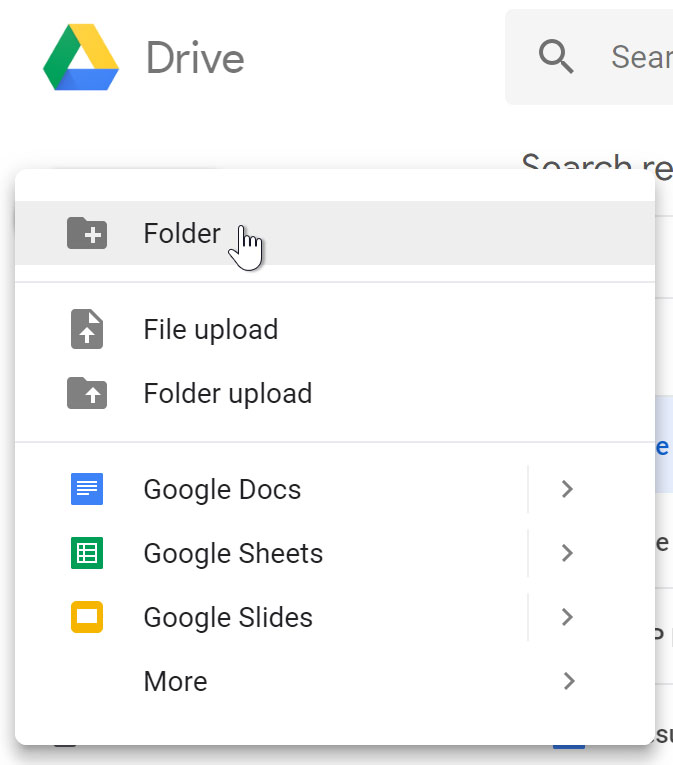
  1. From Google Drive, click the New button, then select Folder from the drop-down menu.
    Creating a new folder.
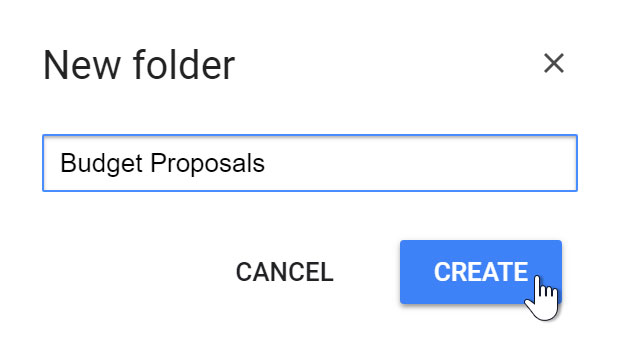
  2. A dialog box will appear. Enter a name for your folder, then click Create.
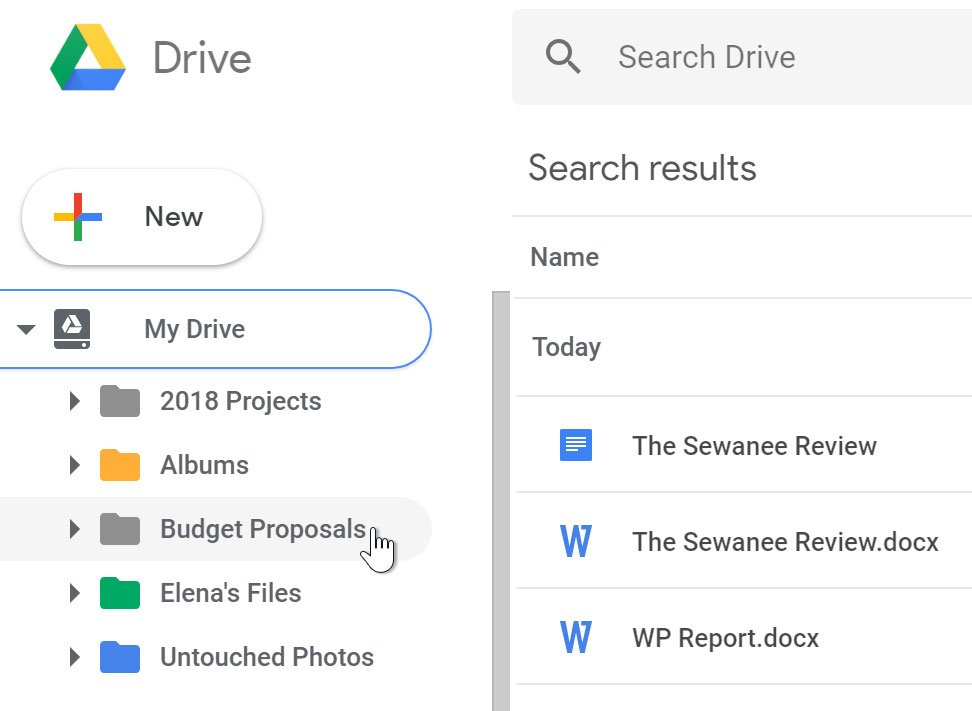
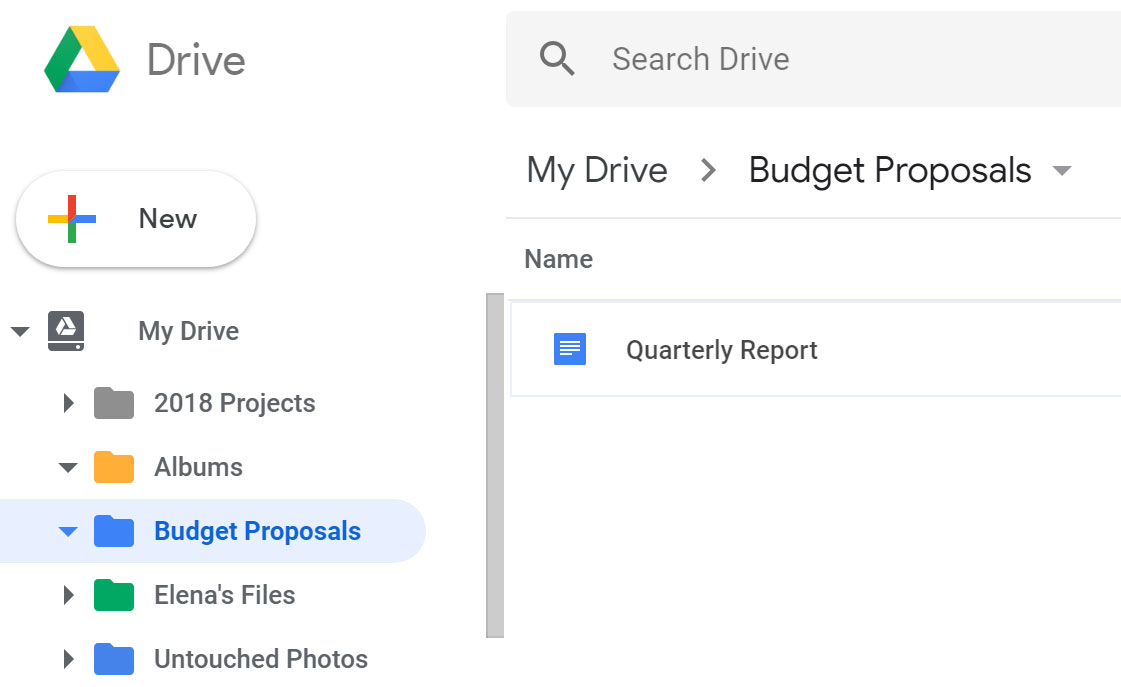
  3. Your folder will appear on the left below My Drive. You may need to click the drop-down arrow to see your folders.
    Folder in Drive.

To move files into folders:

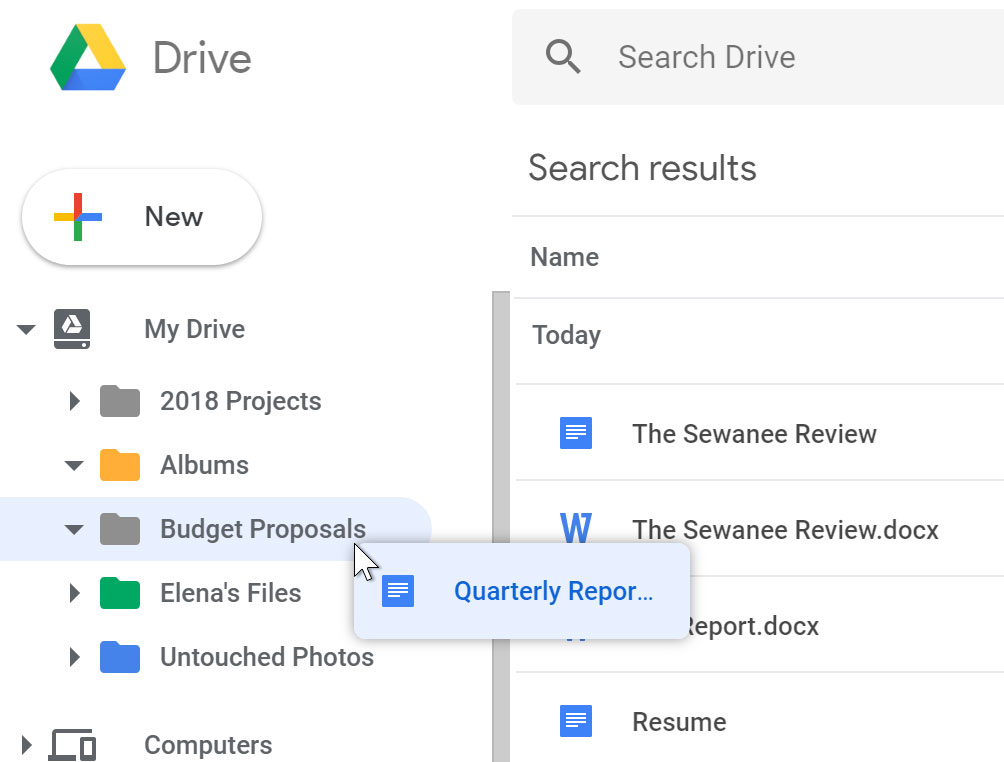
  1. Click and drag the file to the desired folder.
    Clicking and dragging file to folder.
  2. The file will appear in the selected folder.
    File moved to folder.
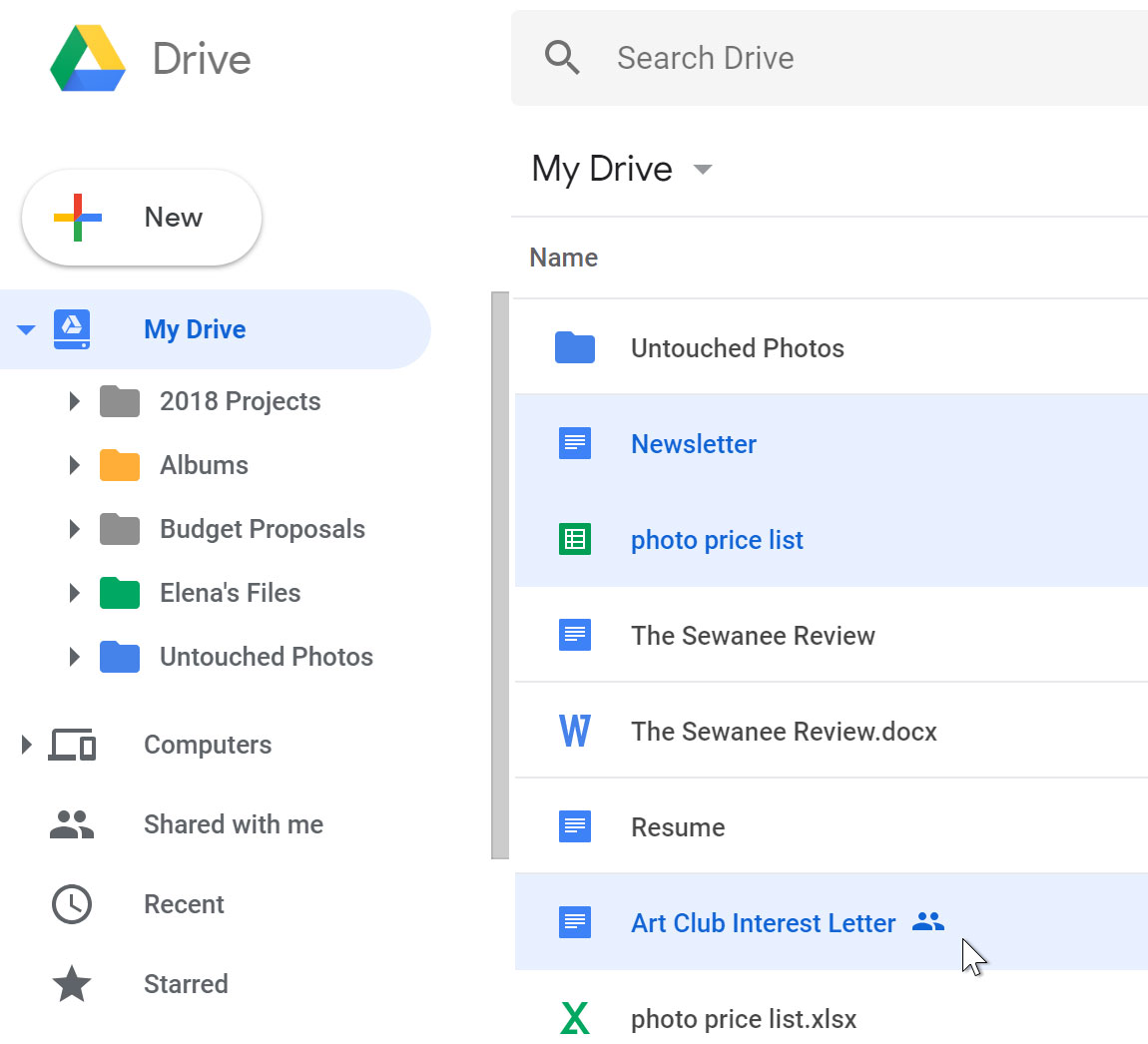
To add multiple files to the same folder, press and hold the Ctrl key (orCommand on a Mac), then click to select each desired file. When you're ready, click and drag the files to the desired folder.
Selecting multiple files.

To delete a file:

Friday, November 2, 2018

nov 5 and 8 COMPUTERS AND NETWORKS

Please........
1.Be on time
2.Log onto the site for this class. 
You get a grade for this.
3.When I am giving instructions, 
be in a seat.
4. Do not interfere with instructions
or disrupt class. 
5. When I am giving instructions, your phones and headphones should be invisible. MNPS has specific regulations  for electronic devices. Security of your electronic devices is your responsibility.
6. Do what I ask you to do, when I ask you.
7. Follow all school rules and MNPS rules.
8. It is your responsibility to make up missing assignments. No late work will be accepted after two weeks from the date assigned. The only exception is for excused absences.
9. Be respectful of others.

Return signed document for a "big" grade. Past due.

Check your grades today


No phones except for classwork.

No earbuds or headphones for music. Use for classwork only.


Your grade:
4_advanced_93-100 points. A strong amount of work has been completed. All instructions & specifications met. A comprehensive and wide-ranging exploration of visual qualities, the representation of ideas, media experiments, and technical practice is demonstrated. The work reflects superior thought and imagination.

3_proficient_85-92 points. A reasonable amount of work has been completed. Most instructions and specifications met. The work illustrates satisfactory exploration of visual qualities, and the representation of ideas. There is satisfactory evidence of work on images, media experiments, and technical practice.

2_basic_75-84 points. A small amount of work has been completed. Some instructions and specifications met. The work illustrates some exploration of visual qualities, the representation of ideas. There is some evidence of work on images, media experiments and technical practice.

1_below basic_74 and below. A less than adequate amount of work has been completed. There is little evidence of work on images, media, and technical practice.


0_No work attempted

Homework: Set up a Google account. Due Tuesday. We will begin using Google Drive. Due today.
https://www.wikihow.com/Make-a-Google-Account


Today:

•In Notes....... DIGITAL CONTENT, 
     Bandwidth

•Assignment:
 
Part 2_Discuss the impact of network speeds, wireless communication, firewalls, and gateways on individual and societal productivity. (see below)

Due today at topperselfie@gmail.com
Make sure your name is on the email.

• Make a new folder in your Google Drive. Title it Portfolio_your first and last name_A2
How to make a new folder in Google drive:
https://topperselfie.blogspot.com/2018/11/create-new-folder-in-google-drive.html

• Upload your work you have completed in this class into this Portfolio folder on Google drive.
Your work should be located in documents on your computer. 


Objectives

•Write a paragraph or two that discusses the impact of network speeds, wireless communication, firewalls, and gateways on individual and societal productivity. 


Assignment Part 2:
Read and summarize this article in one paragraph of 5 or more sentences. https://pctechmag.com/2015/03/the-impact-of-internet-speed-on-business-productivity/

Suggestions for article summary:

Opening sentence
Network speeds, wireless communication, firewalls, and gateways have impacted individual and societal productivity. 

Mention
bandwidth, how internet can help a business, what business services (what software is mentioned here), and retail services and franchises.

Summarize with a closing sentence.